
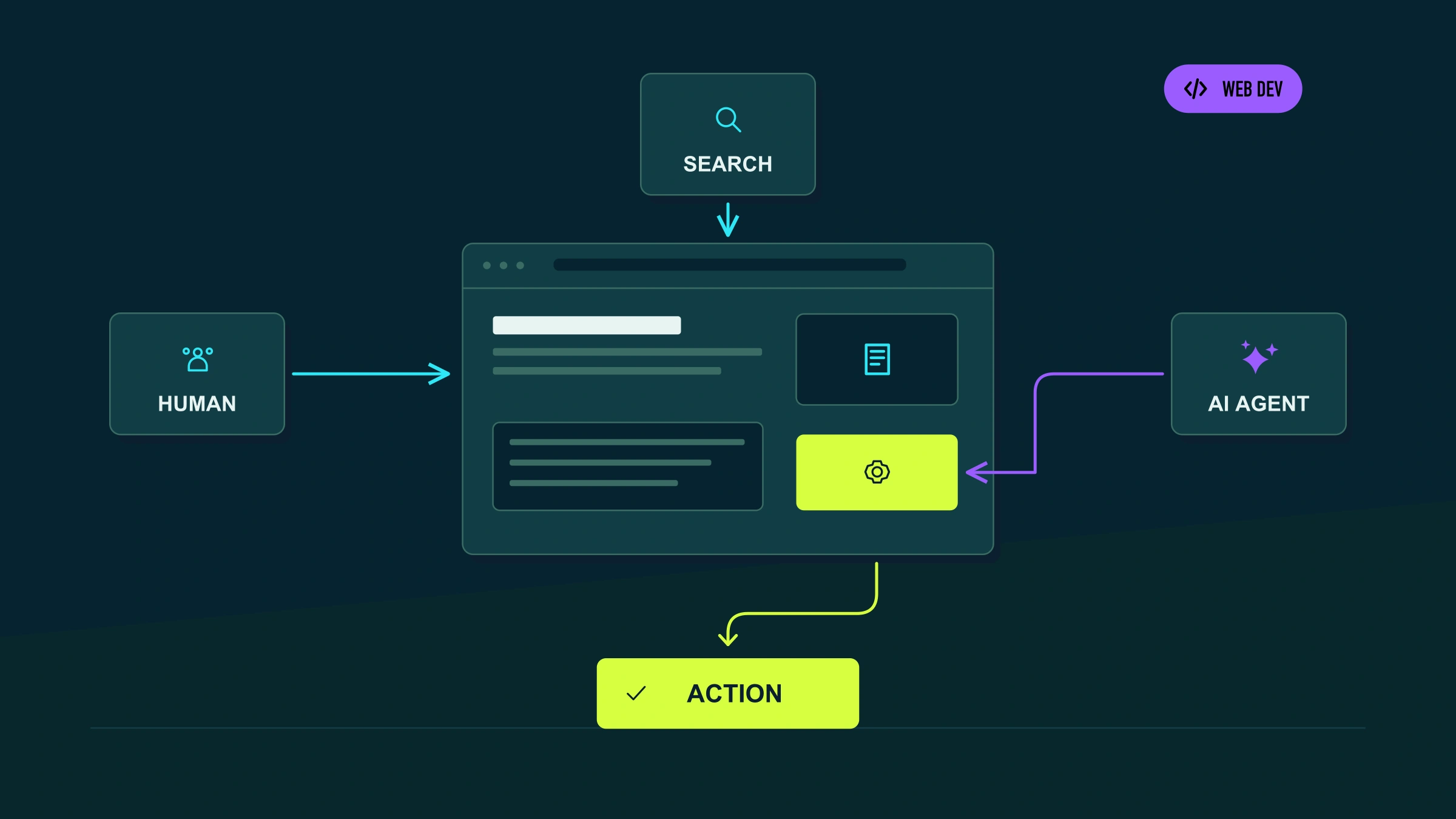
For years, we designed websites with two main users in mind.
The first was obvious: the person.
The second was not always as visible, but it shaped much of the work: the search engine.
Now a third is beginning to appear.
An AI agent that does not simply enter a page to read it, but tries to do something inside it on behalf of a person.
Find a product. Compare options. Fill out a form. Book an appointment. Add something to the cart. Request a quote.
This shift is still at an early stage, and it would be a mistake to sell it as if all web traffic were going to work this way tomorrow.
But it would also be a mistake to ignore it.
Chrome is developing new tools specifically for this so-called agentic web, including WebMCP and a new Lighthouse audit category designed to evaluate how well an agent can interact with a website.
The question is no longer only:
Can someone find and understand my website?
It is also becoming:
Can an agent use it correctly?
From “finding a website” to “using a website”
This distinction helps explain almost the entire topic.
Google puts it quite simply:
1. Agents search the web.
2. Agents use the web.
When an agent is trying to find information, many of the principles we already know still apply: SEO, content, crawling, architecture, information accessibility, and authority.
When the agent reaches a website and tries to complete an action, a different problem appears.
Consider requests like these:
“Find me a consultation with this lawyer for next Tuesday.”
“Book a private tour in Rome for four people.”
“Get a quote to replace this roof.”
“Add this product to the cart and check the shipping cost.”
For a person, completing these tasks means interpreting buttons, reading labels, opening menus, filling in fields, and responding to visual changes.
An agent has to reconstruct that same journey through machine-readable information.
And that is where an apparently “beautiful and functional” website can start to fail.
What does an agent actually see when it enters a website?
It does not necessarily see the page the way we do.
Agents can use different representations, including screenshots, HTML and, especially importantly, the accessibility tree of the page.
That has an interesting consequence.
Many decisions we have advocated for years in the name of accessibility, development quality, and UX also make agents’ work easier.
For example:
- buttons with clear names;
- properly labeled forms;
- semantic HTML;
- predictable states;
- consistent navigation;
- identifiable interactive elements;
- stable layouts;
- clear success and error messages.
An interface that depends too heavily on animations, shifting positions, unlabeled icons, or implicit visual behavior may be perfectly understandable to a person and much harder to interpret automatically.
That is why the so-called agent-ready web does not necessarily begin by installing a new technology.
It begins by building the website properly.
So, what is WebMCP?
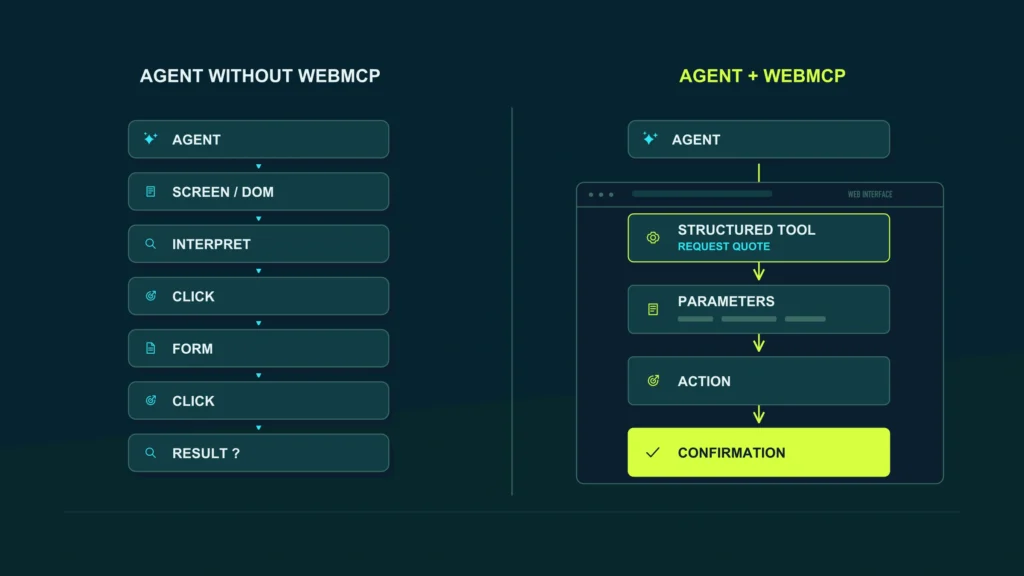
WebMCP, or Web Model Context Protocol, is a proposed web standard that allows a page to expose structured tools to AI agents.
Instead of forcing the agent to infer:
“I think that button is for booking, and then I have to fill in those five fields…”
the website can tell it directly:
“I have an action called bookAppointment and it requires these data.”
Chrome describes WebMCP as a way to provide tools through JavaScript or annotations in HTML forms, so the agent can understand more clearly how to interact with specific page functions.
The important idea is not the name of the API.
It is the change in the interaction model.
Before:
Agent → observes interface → tries to interpret actions → simulates clicks → hopes it works.
With structured tools:
Agent → discovers available capabilities → knows the required parameters → executes an action defined by the website itself.
That can make certain tasks much more reliable.
A simple example
Imagine a clinic.
The website has a form with:
- specialty;
- doctor;
- date;
- time;
- name;
- phone number.
An agent could try to complete that process by navigating the site visually.
But the application could also expose a conceptual tool such as:
Book appointment
which requires:
- specialty;
- date;
- time slot;
- patient details.
The agent no longer has to discover the entire logic by looking at the form.
The application itself is telling it what it can do and what it needs in order to do it.
Chrome frames WebMCP around exactly this type of action and uses examples such as booking slots or adding products to a cart.
Does that mean every website needs to implement WebMCP?
No.
And this is where it is worth slowing down the technological enthusiasm a little.
WebMCP is still a proposed standard, not a universal feature that every company needs to integrate immediately. Chrome is keeping it within an experimental process, and the specification continues to evolve.
There is also a major difference between a corporate website where users mostly read information and a platform where users need to carry out complex actions.
A simple corporate website
Probably gets more immediate value from:
- semantic HTML;
- good accessibility;
- clear structure;
- understandable forms;
- good architecture;
- performance;
- SEO.
Ecommerce
Can start to have much more interesting use cases:
- search for products;
- check inventory;
- add to cart;
- compare options;
- calculate costs.
SaaS
Even more:
- create resources;
- query data;
- change settings;
- run workflows.
Bookings and services
It is also a natural fit for:
- check availability;
- book;
- request a quote;
- cancel;
- modify appointments.
That is why the right question is not:
“Should we install WebMCP?”
It is:
What critical tasks do our users perform, and would it make sense for an agent to carry them out reliably?
The best preparation for agents is still a good website
There is one part of this topic that I think matters more than WebMCP.
In 2026, Chrome launched a new Agentic Browsing category inside Lighthouse.
And what does it check?
Not only whether WebMCP exists.
It also looks at much more familiar elements.
Accessibility
Agents rely heavily on the accessibility tree.
That is why interactive elements need clear programmatic names.
Visual stability
Lighthouse uses signals related to layout stability because an element that unexpectedly changes position can cause an agent to interact with something other than what it intended.
WebMCP
It can also review registered tools, forms that could be exposed declaratively, and the validity of the schemas being used.
And there is an important detail.
Google says that, for now, this category is informational and is not benchmarked like a traditional Lighthouse score.
In other words, there is still no “92/100 agent-ready score” that we should start chasing as the next obsession.
We are talking about readiness signals, not another number to put in a report.
7 things I would review before calling a website “agent-ready”
1. Semantic HTML
A button should behave like a button.
A link should be a link.
A form should use recognizable controls.
The more we invent our own visual interface while ignoring native HTML behavior, the more work we create for people, assistive technologies, and now agents as well.
2. Accessibility
Accessibility is still for people first.
The fact that it also benefits agents should not reverse that priority.
Labels, accessible names, hierarchy, focus, and clear states help create a more understandable representation of the interface.
Chrome specifically points to the accessibility tree as one of the main ways an agent can interpret a page.
3. Predictable forms
A quote request form may seem trivial.
But if fields have no labels, information appears only in placeholders, validation changes without explanation, error states disappear, or steps depend on animations, the process becomes more fragile.
Good UX for agents often starts with the same question we ask for a person:
Is it clear what I should do now?
4. Stable states
An interface where buttons move, content appears over other elements, or the layout keeps changing can produce incorrect interactions.
Chrome specifically includes visual stability in its agentic browsing audits.
This also reinforces something important:
Animations are not the enemy.
Uncontrolled animations can be.
5. Well-defined actions
This is where WebMCP starts to make sense.
In an application with important actions, we could ask:
- what should an agent be able to do?;
- what parameters does it need?;
- what does it return?;
- when does it require confirmation?;
- what should it not execute automatically?
The goal is not to expose every button on the website as a tool.
Chrome recommends designing WebMCP around critical user journeys, meaning journeys that genuinely matter to the user.
6. Security and confirmations
Allowing an agent to execute actions introduces problems that a purely informational website did not have.
Chrome has dedicated documentation on WebMCP security because LLM-based agents can be vulnerable to indirect prompt injection: content that attempts to manipulate the agent’s behavior.
That is why sensitive actions need controls.
We would not want a hidden instruction on a page to automatically trigger:
- a purchase;
- a deletion;
- a critical change;
- a transfer of information.
Irreversible actions need guardrails and, where appropriate, explicit user confirmation.
Agent-ready cannot mean giving permission to everything.
7. Measurement and testing
It is not enough to declare a tool and assume an agent will use it correctly.
Flows need to be tested.
Chrome is developing specific tools to reproduce, debug, and validate these journeys.
The objective is very similar to traditional QA:
Can the task we designed actually be completed?
WebMCP is not the same as MCP
The names are similar enough that they will probably create plenty of confusion.
MCP, or Model Context Protocol, and WebMCP do not solve exactly the same problem.
Chrome explicitly explains that WebMCP does not replace MCP.
To simplify it considerably:
MCP
Allows systems, tools, and data to connect with agents at the application, backend, or ecosystem level.
WebMCP
Helps an agent that is already interacting with a page better understand the capabilities that website offers.
A company may end up using both.
We do not need to choose one or the other as if they were competing technologies.
A good website for humans probably starts with an advantage
There is an interesting conclusion behind all of this.
Many recommendations for making a website more accessible to agents have been recommendations for building better websites for years.
Correct HTML.
Accessibility.
Clear forms.
Stable layouts.
Predictable states.
Understandable architecture.
Performance.
That seems far more important to me than chasing the latest experimental attribute.
The web design and development strategy should have those fundamentals in place before asking which new API to add.
WebMCP can become an additional layer.
It should not become an excuse to ignore basic problems.
Which types of companies should pay attention first
Not all of them have the same level of urgency.
I would start with businesses where there is a clearly executable digital task.
Ecommerce
Because there is a fairly clear sequence:
search → compare → choose → cart → checkout.
Travel and hospitality
search availability → compare options → book.
Healthcare and appointments
service → professional → date → booking.
SaaS
query → configure → create → modify → execute.
Professional services
qualify need → request information → book consultation → request proposal.
Marketplaces
search → filter → select → transact.
The more important the interaction inside the website, the more relevant this topic becomes.
On an editorial website whose main purpose is reading content, the priority will probably remain much closer to Search, content, accessibility, and experience.
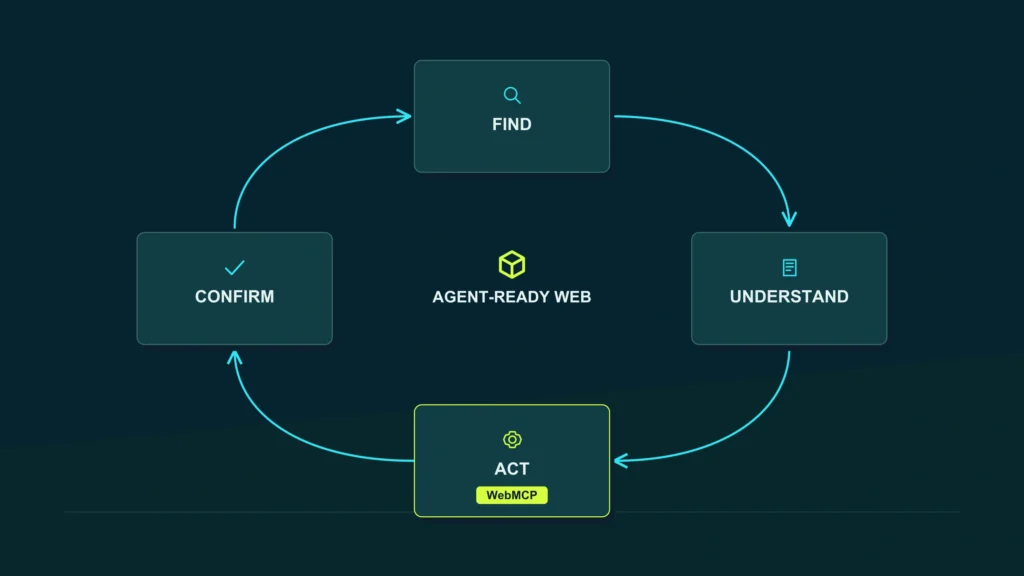
A simple framework: Find → Understand → Act → Confirm
To analyze a website from this perspective, I would not start with WebMCP.
I would start with four questions.
Find
Can the agent find the right page or functionality?
This includes:
- SEO;
- navigation;
- architecture;
- links;
- internal search.
Understand
Can it interpret what it can do?
This includes:
- HTML;
- accessibility;
- labels;
- semantics;
- states;
- structure.
Act
Can it complete the task reliably?
This can include:
- clear forms;
- stable UI;
- WebMCP;
- structured tools;
- internal APIs.
Confirm
Can it understand what happened afterward?
Purchase completed.
Booking confirmed.
Error.
Request sent.
Action pending.
An experience does not end when the agent clicks.
It ends when it knows whether the action worked.
The big change: the web starts to have two interfaces
This may be the idea I find most interesting in this entire topic.
Until now, we have thought of the interface mainly as something visual.
Buttons.
Menus.
Cards.
Forms.
But WebMCP proposes a second, parallel interface:
the structured interface that a machine can consume directly.
A person might still see:
Book appointment
while the agent discovers:
book_appointment
with a precise schema for the data it needs.
That does not mean the visual web stops mattering.
Quite the opposite.
Both layers have to represent the same business logic.
That opens a much more interesting conversation than “what color should the button be?”
It is product architecture.
What I would not do yet
I would not rebuild a corporate website simply because WebMCP exists.
I would not add agentic tools to every function.
I would not expose sensitive actions without a security model.
I would not sell “agent-ready” as a certification.
I would not promise that implementing WebMCP produces more traffic.
I would not present current experimentation as a universal standard already adopted by every browser.
And I would not ignore the topic either.
We are at exactly the point where it makes sense to understand it, experiment with concrete use cases, and keep the architecture ready, without turning every experiment into an urgent commercial requirement.
What should a company do today?
For most companies, I would start with an audit that is not particularly futuristic.
1. Review accessibility.
2. Review HTML and semantics.
3. Review forms and critical journeys.
4. Review stability and performance.
5. Identify which actions would make sense to delegate to an agent.
Only then would I ask:
Is there a real use case for WebMCP here?
If the answer is yes, we can then define tools, parameters, permissions, and confirmations.
That order prevents us from implementing technology simply because it is fashionable.
Is this the new SEO?
No.
At least not in the way it is sometimes being framed.
Chrome explicitly distinguishes between:
agents that search
and
agents that act inside websites.
For the first, Search and discovery principles still apply.
For the second, new needs emerge around UX, accessibility, stability, and agentic interfaces such as WebMCP.
That means the problem is expanding.
SEO helps the website get found.
Design and development help make it usable.
An agent-ready web adds a new question:
Can an agent use it correctly too?
For Cubo SEO, that connection between Search + Web + AI is much more interesting than turning WebMCP into another isolated acronym.
Frequently asked questions
What is WebMCP?
WebMCP is a proposed web standard that allows a page to expose structured tools to AI agents through JavaScript or HTML form annotations. Its goal is to improve the reliability with which an agent can execute certain tasks inside a website.
Is WebMCP already a final standard?
No. It is currently still an evolving proposal, and Chrome continues experimenting with its implementation.
Do I need WebMCP for ChatGPT or Google to find my website?
No. WebMCP is primarily focused on interaction and actions inside a website. Discovery and search still depend on other layers such as SEO, crawling, indexing, and content.
Does WebMCP replace MCP?
No. Chrome specifies that WebMCP and MCP address different needs and can coexist.
Can WordPress use WebMCP?
Conceptually, yes, because WebMCP can be added on top of certain page capabilities. Whether it makes sense and exactly how it should be implemented depends on the site, its forms, its logic, and its functionality. That does not mean there is a universal plugin that automatically turns any WordPress site into an agent-ready website.
Does an accessible website work better for agents?
In many cases, yes. Chrome explains that agents can use the accessibility tree as an important source for interpreting a page, and its agentic audits include accessibility-related checks.
Does implementing WebMCP improve SEO?
There is no official evidence to support that claim. WebMCP is designed to improve agent interaction and task execution, not to increase organic rankings.
The web is not going to stop being for people
The most interesting part of the agentic web is not imagining a future in which interfaces disappear.
It is understanding that another way of using them is beginning to emerge.
People will still need good websites.
Search engines will still need to understand them.
And some users will begin delegating tasks to agents that will also need to navigate, interpret, and act inside them.
Preparing for that does not mean installing every experimental technology tomorrow.
It means doing something far more useful:
building a clear, semantic, accessible, stable website that is ready to expose the actions that really matter in a structured way.
If you want to review whether your site has a strong foundation for people, search engines, and new agentic experiences, you can request a strategic assessment with Cubo SEO.